
-18.78%3,43,187 Clients
₹0 Account Opening| ₹20/order – Equity Delivery, Intraday, Futures & Options | ₹0 Commission on Mutual Funds
Open Instant Account with 5paisa5paisa Capital Limited is a Mumbai-based online discount broker. The company started its discount broking operations in 2016 and became second second-largest online discount broker in India by late 2018. It offers a range of stockbroking and investment services to its customers. The company offers trading services in stocks, currencies, commodities and derivatives. Besides, it also offers other financial products like Mutual Funds, futures and options, commodities and more. The company is a Depository Participant of CDSL.
It charges a flat brokerage fee of Rs 20 per executed order, irrespective of the size of the trade. The in-house build trading platform, offered free to all its customers, is another USP of 5paisa.com.
5paisa offers Instant Paperless Trading and Demat Account opening process.
5paisa offers good online trading software to its customers. They can choose from the web, mobile, and desktop trading applications to trade as per their convenience.
Robo advisory and Algo trading are other software offered by the company. Robo Advisory is an investment advisory tool that helps you choose mutual funds as per your age, financial goals and profile. Algo Trading leverages computer programs to analyse markets and place trades on the terminal without manual intervention.
The company also runs 'School', an online learning resource for investor education. It offers informative courses on the Stock Market, Stock Analysis, Mutual Funds, Taxation and Trading.
Key Facts about 5paisa:
5paisa has made good investments in its online trading software and offers a range of trading platforms and tools to its customers free of cost. The various trading platforms and tools offered by the company include:
5paisa mobile trading app offers online trading using smartphone across segments and exchanges. Majority of the trading done with 5paisa is done using 5paisa app.
The trading mobile software is available for Apple and Android smartphones. It offers a range of features to analyze and trade on-the-go. Key features of the 5paisa mobile trading app include:
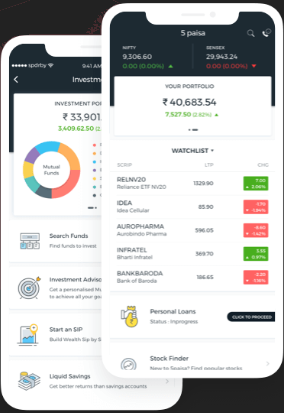
5paisa Mobile App Download
The 5paisa mobile app is available for Google Android and Apple iOS smartphones. The mobile app can be downloaded for free from:
5paisa.com (Trade Station Web) is an online trading website of 5paisa broker. The web browser-based platform is compatible with Chrome, Firefox and Safari browsers. Customers can use their personal computers to access the website and trade. It offers a range of features such as:
Trade Station EXE is a downloadable desktop trading terminal developed by 5paisa. The online trading software can be downloaded on a desktop or a laptop and can be used for trading using the internet. It offers a range of features such as-
5paisa Trade Station provides a broker's terminal like experience with high-speed trading. It offers many useful and advanced trading features to a trader. The online trading software can be downloaded from 5paisa website.
Steps To Download 5paisa Trade Station
Trade Station is a desktop application with several advanced features. Traders, new and experienced, would need to acquaint themselves with the various features and functions of the platform. Currently, 5paisa doesn't provide a trade station desktop app demo video. However, you can contact the customer support of the company to learn in detail about the trade station features.
5paisa algo trading is an automated trading tool that leverages advanced technologies to facilitate automatic trading decisions. Its various features include-
5paisa offers commodity trading services for MCX. 5paisa trading platform for commodity trading includes:
5paisa commodity trading software download is available on its website. Steps to download Trade Station EXE is provided in the above Trade Station EXE review section.
5paisa’s FnO360 is a powerful, all-in-one derivatives trading platform built for both beginners and seasoned options traders. It supports real-time multi-leg strategy execution, advanced analytics, and seamless risk management—all in one interface.
The suite is designed to give traders more control and insight across various option strategies like bull call spread, iron condor, and straddles.
Key Takeaways
5paisa offers ultra-low latency execution infrastructure via XTS and Open APIs, making it ideal for algorithmic traders and high-frequency trading desks. Developers and institutions can use 5paisa’s APIs to build custom trading systems with high-speed order routing, execution, and account-level data access.
Key Takeaways
5paisa offers a compelling Partner Program, where traders, educators, influencers or anyone who has a social circle can earn up to 100% brokerage share for the first 3 months, and lifetime income up to 60% .
The program is designed for those with active connections in trading and investing.
An ecosystem and comes with dashboard tracking, marketing assets and dedicated partner support.
Key Takeaways
The 5paisa Refer & Earn program is an exciting opportunity for traders and investors to invite their friends and family to join our exceptional platform and reap fantastic rewards. You'll receive an account opening payout for each* successful referral.
You'll be eligible for benefits if the referee's demat & trading account is successfully opened as per the terms & conditions. Anyone with a 5paisa Demat account is eligible to participate in the Refer & Earn program.
5paisa offers tailored brokerage and margin solutions for High Net-Worth Individuals (HNIs) and Ultra-HNIs, recognizing their unique trading styles and volume needs. Clients can work with a relationship manager to design a custom brokerage structure that optimizes costs while offering enhanced trading limits and service.
Key Takeaways
5paisa’s trading interface comes with real-time advanced charting tools and integrations with TradingView, Quantsapp, and Sensibull—giving users world-class analytics and execution capabilities from a single terminal.
Key Takeaways
5paisa regularly hosts live webinars, trading conventions, and educational workshops, offering deep insights into markets, derivatives, and technical trading. From beginner guides to expert strategy sessions, 5paisa supports trader education at every level.
Key Takeaways
5paisa is a stock broker offering online trading at BSE, NSE, MCX and NCDEX for a low brokerage fee of Rs 20 per executed order. 5paisa also offers Mutual Fund investment and insurance services. Trading/investing in the stock market and mutual funds can be done using the following steps:
5paisa TradeStation is installable (downloadable exe) desktop software also known as trading terminal. Designed for frequent and advanced traders, this terminal offers superior features and faster execution of orders. You can download the software from the 5paisa website. Here are the steps to use 5paisa trade station:
5paisa only offers online trading services. To trade in 5paisa, you need to open a 2-in-1 trading & demat account and link it with your bank account. Once the account is opened, transfer funds from your bank to the trading account. You can then trade across exchanges and in a range of segments using any of the trading software offered by the company.
5paisa.com is the official website of 5paisa Capital Ltd, an online discount stock broker. The website provides you with all the information on the services provided by the company. A few important services provided on 5paisa.com include:
5paisa offers online intraday trading at BSE, NSE and MCX. Customers can do intraday trading with 5paisa through its website, mobile trading app or installable trading terminal.
Steps to do intraday trading in 5paisa
5paisa allows its customers to convert intraday trades to delivery trades. To convert an intraday trade, go to the 'POSITION' window in the bottom left side, click on the open position and convert it to delivery. Note that all intraday positions are auto squared-off starting at 3:10 PM if they are not closed by the trader.
You can start trading with 5paisa by opening a trading and a demat account and linking them with an existing bank account. Once the account is opened, you can transfer funds from your bank to the trading account, log in to any of the 5paisa trading software (website or mobile app) and place buy/sell orders in desired securities.
ALB in 5paisa is an abbreviation for Adjusted Ledger Balance. This is the balance for the fund which you can withdraw (or transfer back to the bank account). It is part of the fund pay-out logic. It tells how much funds you could withdraw. The ALB is calculated as:
ALB = (Normal Ledger + MTF (Margin Trading Funding) Ledger - Unclear receipts - Value of Undelivered Securities - Total Margin requirement in Commodity, FnO & Currency)
Margin Blocked in 5paisa is the total money blocked as margin for open positions in Futures & Options trade. It is done to cover the potential losses, a position can incur. The blocked margin or money is released once the positions are squared off.
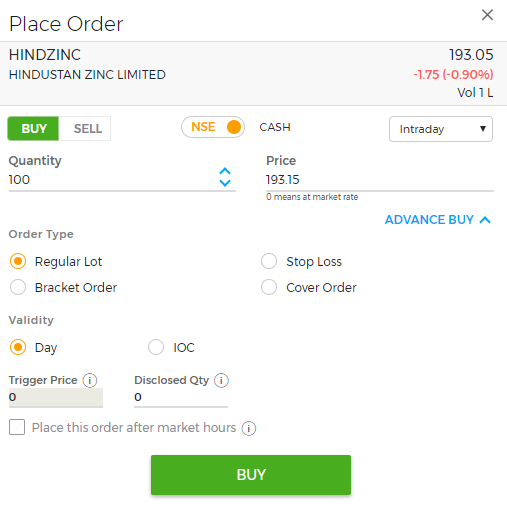
A Bracket Order (BO) is an advance order type which allows traders to limit loss and lock in a profit. 5paisa offers advance order types like BO, Cover order and Stop Loss orders. Customers can choose these order types in the 'Place Order' window while placing orders to buy/sell.
Bracket order is a set of 3 orders (1 Buy, 2 Sell) placed together at once. Say, you place a buy order for a stock at Rs 50. You also place a higher sell order at Rs 55 and lower sell order at Rs 45. The higher sell order locks in the profit and lower sell order limit the losses. The sell order is automatically executed, when the stock reaches any of the price points.
A Cover Order (CO) is an advance order used in intraday trading to minimize the losses in a position. 5paisa offers cover order along with other advance order like bracket order and stop-loss order.
In a CO order, the buy/sell order is placed along with a Stop Loss order (SL). Say, you place a buy order at Rs 50 and also place an SL order of Rs 45. If the stock is going down, a Sell order will be auto executed at Rs 45, preventing you from unlimited losses.
Disclosed quantity in 5Paisa means the part of the actual quantity in an order you want to disclose to the public. The disclosed quantity only will be shown on the market screen, not the actual order size. However, the actual quantity of the order will be executed. It is useful to prevent price spike when a big order is placed.
A square off in 5paisa is an intraday trading practice wherein a buy/sell position is opened on a trading day and is reversed (sell/buy) before the market closes on the same day. This is done to make a profit from the price movement on a day.
If the equity intraday positions are not squared-off by the customer on the same day, 5paisa automatically square-off these orders at 3:15 PM.
In the 5paisa trading app, the trigger price is the price at which a stop-loss order is triggered. Trigger price should be below the Buy price (for selling stop loss) and above the Sell price (for buying stop loss).
The trigger price is set in case of Stop Loss orders, Cover Orders and Bracket Orders. The system automatically executes the trade when the trigger price is hit or reached.
When placing buy/sell order with 5paisa, customers can choose one of the 3 validity, Day, IOC and VDT (Valid Till Date).
IOC in 5paisa is an abbreviation for 'Immediate or Cancelled' order type. It means an order placed has to be executed immediately if the set price is available or it is canceled. A part of the IOC order can be executed with the unmatched part getting canceled.
To sell shares on 5paisa, log in to your trading account (website or mobile app) and place a sell order by entering details like quantity, price etc. Please ensure that you're selling the exact or lower number of shares than you currently hold in your demat account. Your order will be executed when the set price is reached on the trading day.
To buy orders on 5paisa, you need to open a 2-in-1 account and login to the trading website or mobile app. Also, make sure that you've sufficient funds in your trading account. Place a buy order by searching for the desired scrip in the search box, enter quantity, price and order type. The order will be executed when entered price is reached.
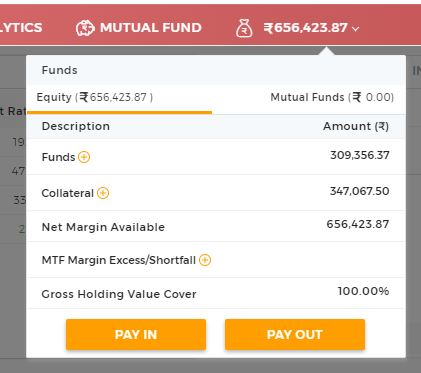
A Payout or fund withdrawal request can be made on any of the 5paisa trading software i.e. website, mobile app or trading terminal. Here a steps to request payout:
1. 5paisa.com Website
2. 5paisa Mobile App
Menu >> Trade >> Funds >> Click on Pay Out
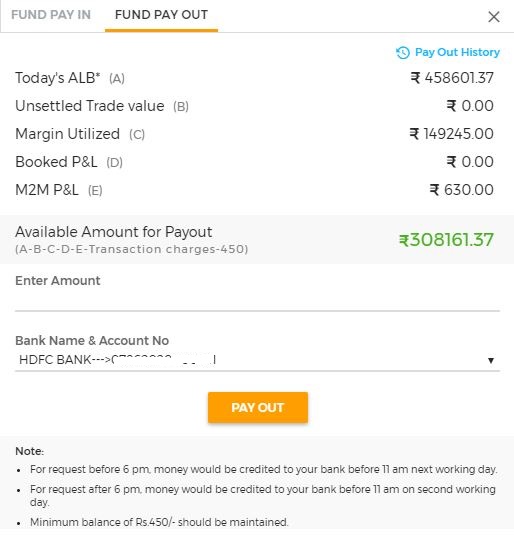
To withdraw funds from 5paisa.com website, login to the website, click on the amount beside mutual funds in top red navigation ribbon, click on Payout button, fill the amount you would like to withdraw and submit the request.
To request a payout on the mobile app, go to the fund's section and click on 'Payout' within it.
The money will be credited within 24 hours of requesting a payout.
Ledger at 5paisa provides details of financial transactions in your trading account. You could choose the date to filter the transactions for Equity and Mutual Funds.
Steps to check ledger on 5paisa website
Steps to check ledger on 5paisa Mobile App
Information on this page was last updated on Saturday, November 18, 2023
₹0 Account Opening| ₹20/order – Equity Delivery, Intraday, Futures & Options | ₹0 Commission on Mutual Funds
Open Instant Account with 5paisa₹0 Account Opening| ₹20/order – Equity Delivery, Intraday, Futures & Options | ₹0 Commission on Mutual Funds
Open Instant Account with 5paisaCompare brokers side-by-side to choose the right one.
Are you a 5paisa Customer?



 Motilal Oswal
 Open Instant Account (Start Trading Today)









 Open 5paisa Account