Published on Wednesday, June 3, 2026 by Chittorgarh.com Team
Zerodha (Flat Rs 20 Per Trade)
Invest brokerage-free Equity Delivery and Direct Mutual Funds (truly no brokerage). Pay flat Rs 20 per trade for Intra-day and F&O. Open Instant Account and start trading today.
It is used when you want to buy or sell a stock instantly at the current market price.
A Limit Order allows you to specify the price at which you want to buy or sell a security.
Example (Buy Limit Order):
Suppose a stock is currently trading at ₹102, but you want to buy it only at ₹100. You can place a buy limit order at ₹100. The order will remain pending until the stock price falls to ₹100 or below. If the price never reaches ₹100, the order will not be executed.
Example (Sell Limit Order):
Suppose a stock is currently trading at ₹100, but you want to sell it only at ₹105. You can place a sell limit order at ₹105. The order will remain pending until the stock price rises to ₹105 or above. If the price never reaches ₹105, the order will not be executed.
A limit order gives you greater control over the execution price, but unlike a market order, execution is not guaranteed.
A Stop-Loss (SL) Order helps limit potential losses by automatically placing an order when a specified trigger price is reached.
Important:
Example (Sell Stop-Loss):
Suppose you bought a stock at ₹100 and want to limit your loss if the price falls. You can place a Sell SL Order with a trigger price of ₹95 and a limit price of ₹94.50. When the stock price reaches ₹95, a sell limit order at ₹94.50 is sent to the exchange.
Example (Buy Stop-Loss):
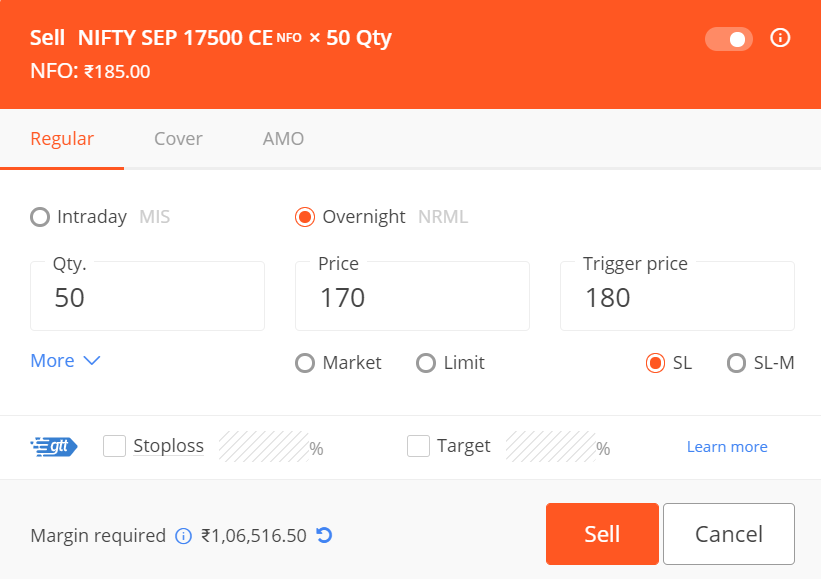
Suppose you have short-sold a stock at ₹100 and want to limit losses if the price rises. You can place a Buy SL Order with a trigger price of ₹105 and a limit price of ₹105.50. When the stock price reaches ₹105, a buy limit order at ₹105.50 is sent to the exchange.
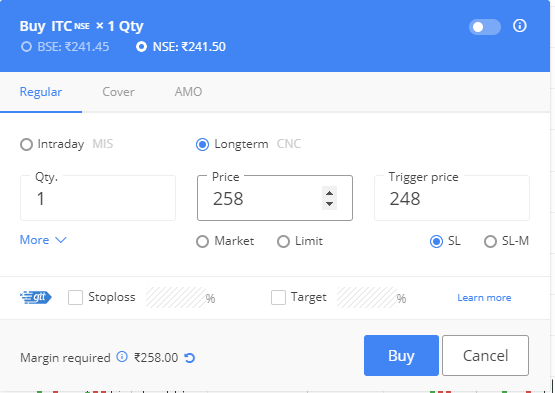
A Stop-Loss Market (SL-M) Order works like a Stop-Loss Order, but instead of placing a limit order, it places a market order once the trigger price is reached.
Example:
Suppose you bought a stock at ₹100 and want to limit your downside risk. You place an SL-M order with a trigger price of ₹95. If the stock falls to ₹95, a market sell order is immediately sent to the exchange and executed at the best available market price.
One correction: the statement "For a Buy SL, the trigger price should be below the limit price" is technically correct, but readers often misunderstand it. The more important concept is:
A Good Till Triggered (GTT) Order allows you to place buy or sell orders that remain active for up to 365 days without requiring daily re-entry.
Example:
Suppose a stock is trading at ₹950 and you want to buy it only if it falls to ₹900. You can place a GTT buy order with a trigger price of ₹900. The order will remain active for up to 365 days and will be sent to the exchange only when the trigger price is reached.

A Cover Order (CO) is an intraday order type that combines a regular buy or sell order with a compulsory stop-loss order. It helps traders manage risk by automatically limiting potential losses if the market moves against their position.
How Cover Orders Work?
Example (Buy Cover Order):
Suppose a stock is trading at ₹100 and you expect the price to rise. You place a buy cover order at ₹100 with a stop-loss trigger at ₹95. If the stock price falls to ₹95, the stop-loss order is automatically triggered, helping limit your losses.
Example (Sell Cover Order):
Suppose you short-sell a stock at ₹100 and want to limit your risk. You place a sell cover order with a stop-loss trigger at ₹105. If the stock price rises to ₹105, the stop-loss order is triggered and the position is exited.
Important Points
An After Market Order (AMO) allows investors and traders to place buy or sell orders outside regular market hours. These orders are sent to the exchange when the market opens on the next trading day.
| Segment | AMO Timing |
|---|---|
| Equity (NSE & BSE) | 4:00 PM to 8:58 AM |
| Futures & Options (F&O) | 3:45 PM to 9:11 AM |
| Currency Derivatives | 5:00 PM to 8:59 AM |
| Commodities (MCX) | 11:30 PM / 11:55 PM to 8:58 AM* |
*MCX AMO timings vary based on daylight saving time schedules.
Example:
Suppose you want to buy shares based on a company's earnings announcement released after market hours. Instead of waiting for the market to open, you can place an AMO in advance, and it will be sent to the exchange when trading begins on the next trading day.
A Regular Order is any standard buy/sell order placed during market hours or pre/post-market sessions.
With Basket Orders, you can place multiple orders together at once.
An Iceberg Order allows traders to split a large order into multiple smaller orders (called legs) that are executed sequentially. This helps reduce market impact, improve execution efficiency, and conceal the actual order size from other market participants.
Example:
Suppose you want to buy 6,500 Nifty option contracts. Instead of placing one large order, you can split it into 5 legs of 1,300 contracts each. The first leg is sent to the exchange, and subsequent legs are placed automatically after the previous leg is executed.
When placing an order, you also choose the validity period, which determines how long the order remains active.
Zerodha allows order placement during pre-market, regular market, and after-market hours.
| Order Type | Segment | Timings | Details |
|---|---|---|---|
| Pre-Market Order | Equity (NSE, BSE) | 9:00 AM – 9:08 AM | Place, modify, or cancel orders during this time. |
| 9:08 AM – 9:15 AM | Orders matched and trades confirmed. | ||
| Note: Available only in the Equity segment. Order placement is allowed only during the first 8 minutes. | |||
| Regular Market Order | All Segments | 9:15 AM – 3:30 PM | Market, Limit, Stop-Loss, and Cover Orders for intraday or delivery. |
| Closing Session | Equity (Delivery) | 3:40 PM – 4:00 PM | Closing session orders placed using CNC at the closing price. |
| Post-market session is generally low in liquidity. | |||
| After-Market Order (AMO) | Equity | 4:00 PM – 8:58 AM | Orders can be placed for any segment or product type. |
| Currency | 4:00 PM – 8:59 AM | - | |
| F&O | 4:00 PM – 9:10 AM | - | |
| Commodity (MCX) | Anytime (24x7) | - | |
| Charges for AMO | All Segments | – | ₹0 (No extra charges for AMO orders) |
| Order Type | Price Control | Trigger Required | Valid Beyond Trading Day |
|---|---|---|---|
| Market Order | No | No | No |
| Limit Order | Yes | No | No |
| SL Order | Yes | Yes | No |
| SL-M Order | No | Yes | No |
| GTT Order | Yes | Yes | Yes (up to 1 year) |
| AMO | Depends on the selected order | No | Next trading session |
| Iceberg | Depends on the selected order | No | No |
Suppose a stock is currently trading at ₹100:
| Order Type | When to Use |
|---|---|
| Market Order | When execution is more important than the exact price. |
| Limit Order | When you want to buy or sell only at a specific price. |
| Stop-Loss Order (SL) | When you want to limit losses or protect profits. |
| GTT Order | When you want an order to remain active for a long period without monitoring the market daily. |
A GTT (Good Till Triggered) order on Zerodha allows you to set buy or sell conditions that remain active for up to one year. When the trigger price is hit, the order is sent to the exchange. It’s ideal for long-term investors who don’t monitor the market daily.
GTT orders are especially useful for swing or positional traders. They reduce the need to track prices constantly and automate entries.
Bracket Orders (BO) let you place an intraday trade with both a target and a stop-loss. Once the main order executes, both exit orders are placed and managed automatically.
BOs offered higher leverage due to the compulsory stop-loss. However, due to volatility risks causing duplicate executions, Zerodha disabled them on Kite in March 2020 to protect clients and reduce exposure.
Zerodha offers several order types on its Kite trading platform, each designed to suit different trading needs and strategies. Here's a simple breakdown of the most common order types:
Basic Order Types
Advanced Order Types
Validity Options
IOC (Immediate or Cancel): Executes immediately, and any unfilled portion is cancelled. Suitable for high-volume or urgent trades.
A limit order in Zerodha allows you to buy or sell a stock at a specific price or better. The trade executes only if the market reaches your set price, giving you full control over the execution rate.
To cancel an order in Zerodha, go to the ‘Orders’ tab on the Kite app or web platform. Find the order under ‘Pending’, then click or tap on ‘Cancel’ next to the order to remove it.
No, Zerodha does not allow GTT orders for options. GTT (Good Till Triggered) orders are currently available only for Equity Delivery stocks and Nifty/Bank Nifty Futures & Options (F&O). They are not supported for stock options or intraday trades.
No, you cannot use bracket orders in Zerodha currently. Zerodha disabled Bracket Orders (BO) on the Kite platform in March 2020 due to issues during high market volatility, which led to execution risks. Only Cover Orders (CO) are available for intraday trades with built-in stop-loss features.
Yes, you can place orders for the next day on Zerodha using AMO (After Market Orders). These allow you to schedule trades outside market hours, which are then sent to the exchange when the market opens. AMO is useful if you're unable to trade during regular hours.
Zerodha Order Book is a section in the Kite platform where you can view all your placed, pending, executed, or cancelled orders in real time. It helps you track the status of each order, modify or cancel pending ones, and see detailed order information like time, price, quantity, and product type.
Most beginners use Market Orders for immediate execution and Limit Orders for better price control.
No, Zerodha does not charge any additional fees for AMO orders.
Yes, pending orders can be modified before execution through the Kite order book.
Stop-Loss (SL) and Stop-Loss Market (SL-M) orders are specifically designed to limit losses.
A Market Order prioritizes execution, while a Limit Order prioritizes price.