Published on Wednesday, May 19, 2021 by Chittorgarh.com Team | Modified on Tuesday, June 2, 2026
Zerodha Account Opening
Instant Free Account Opening| Free Equity Delivery & Mutual Funds| ₹20/trade on Intraday & F&O
India’s most trusted trading platform 💹
🔓 Open Account – FREE⏱ 5 min | 100% Online | Paperless
LTP (Last Traded Price) in Zerodha is the price at which the most recent trade was executed on the exchange. It represents the latest available market price of a security and helps traders and investors track current market movements and make informed trading decisions.
Zerodha customers can view the LTP of a stock, ETF, index, or derivative contract by adding it to their Marketwatch in Kite. The LTP is updated in real time during market hours and is displayed alongside the price change and percentage change.
Example:
If you add Blue Star Ltd. to your Marketwatch for both NSE and BSE, Kite will display the LTP separately for each exchange. Along with the LTP, Kite also shows the percentage or absolute price change. By default, this change is calculated with reference to the previous day's closing price, although users can switch the calculation to the day's opening price through Marketwatch settings.
The colour indicators help identify price movement:
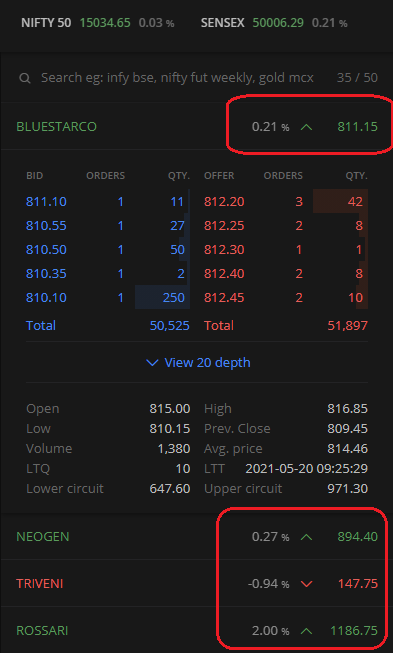
In the above, we can see that the LTP of Bluestar on BSE is Rs. 811.10 and is 0.35% up from the previous day's close price, whereas the LTP on NSE is Rs.819 and is 1.41% higher than the closing price from the previous day.
| LTP | Closing Price |
|---|---|
| The LTP is the price of the most recent trade executed on the exchange. | The closing price is the weighted average price of trades executed during the last 30 minutes of trading. |
| Updates continuously throughout market hours. | Determined after market close using exchange methodology. |
| Displayed prominently in Marketwatch, holdings, order windows, and market depth. | Available through Market Depth and exchange data. |
| Reflects the latest transaction price. | Represents the official closing value used for daily performance calculations. |
| Changes every time a new trade occurs. | Remains fixed once the exchange publishes the closing price. |
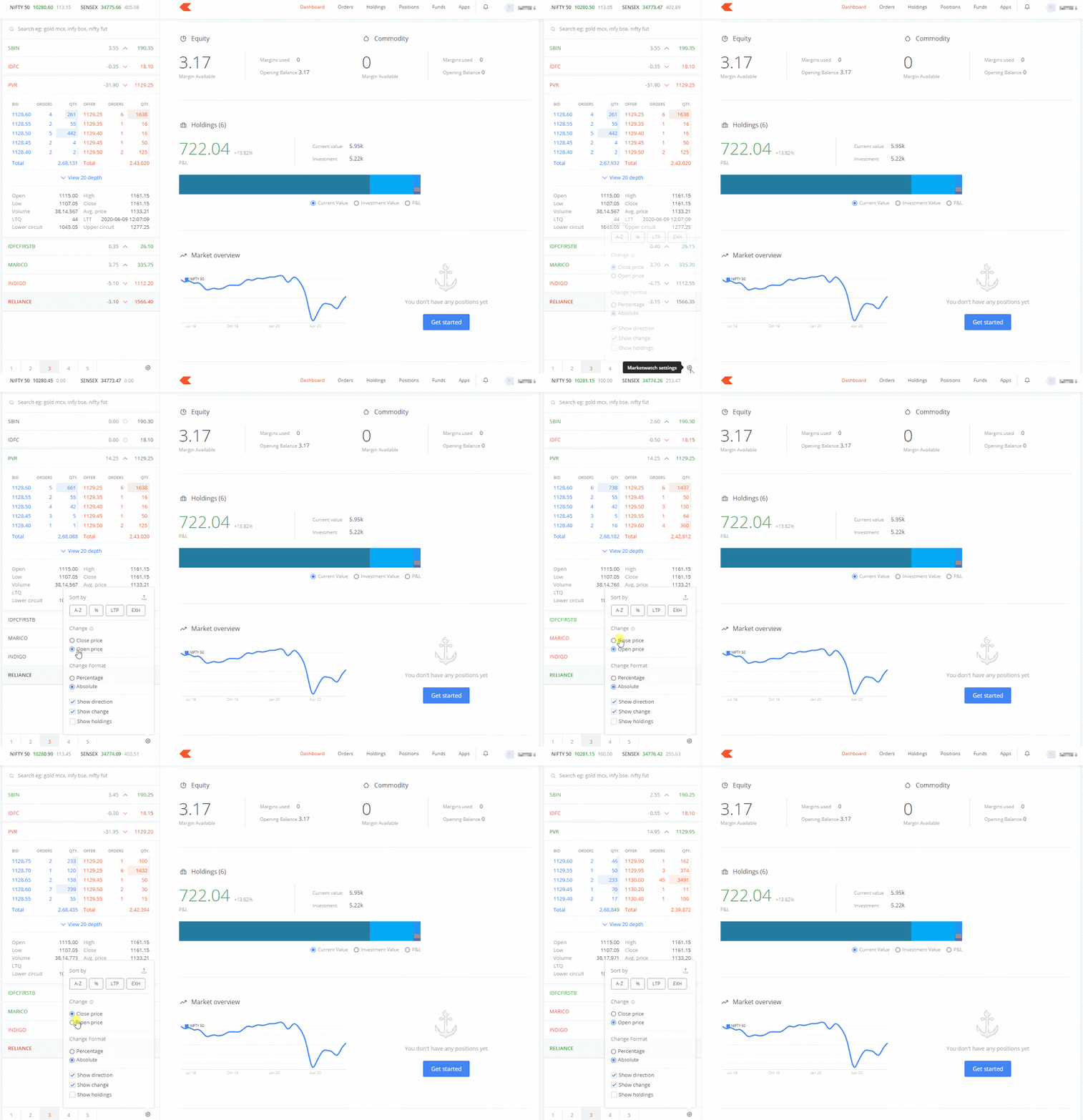
The LTP percentage in Zerodha, by default, reflects % movement of stock from its previous day closing price. However, Zerodha offers its clients an option to view the LTP percentage change of stock from its opening price.
Steps to view LTP % movement from the opening price
Users can also choose between:
This will change the setting to view the LTP % movement from the day's opening price. You also have an option to view the LTP movement in absolute value terms instead of %.
The Holdings section in Kite also displays the LTP of your investments. The value may occasionally differ slightly from the Marketwatch because different modules refresh at different intervals and may use different exchange references depending on the security.
For Futures and Options contracts, the LTP reflects the latest traded price during market hours. Before the market opens, Kite may temporarily display settlement prices or exchange-provided theoretical prices for contracts that have low liquidity or no recent trades.
Invest Smarter with India’s Leading Discount Broker
LTP or Last Traded Price in Zerodha means the price at which the stock was last traded. The LTP of stock gives a hint to a trader on the direction of price movement. The LTP is different from the Closing Price of the stock. LTP is the price at which the last trade is executed before the market closes at 15:29:59.
The last traded price (LTP) is the actual price of the last transaction.
The LTP is a real-time indicator of a stock's price performance, essential for predicting its future performance.
LTP Example
If the LTP of the stock of ABC Limited is Rs 200 and the investor believes that the price will fall, he can set a bid price of Rs 180. If he expects the price to rise, he can set a price between Rs 205 and Rs 210 to make up the price difference between placing and executing the order.
Steps to check LTP in Zerodha
LTP Meaning
LTP (Last Traded Price) indicates the last price at which the share was bought and/or sold. The significance of the LTP lies in its fluctuations, as the LTP of a share varies throughout its life.
LTP Percentage in Zerodha
The LTP percentage in Zerodha is calculated as the percentage change in the last traded price compared to the previous day's closing price.
ATP Meaning
The ATP (Average traded price) is the price that buyers pay for a share in a given period. The average traded price is also referred to as the volume-weighted average price, while the LTP is the last traded price at which the last transaction was executed on the stock exchange.
When calculating the average buy price for your shares, it is important to apply the FIFO (First In, First Out) method. This means that the shares you buy are sold first from your account. Using the FIFO method when filing your income tax return is important because the Internal Revenue Service requires it. Note that intraday trades are not taken into account when calculating the purchase average of your holdings. If you sell and repurchase your holdings on the same day, the difference will be considered an intraday gain or loss and will not affect the purchase average of your holdings.







 Open Instant Account (Start Trading Today)